
How to Perform Penetration Testing in Cloud Environments (AWS, Azure, and GCP) - 2026 Edition

From AWS to Azure to GCP, businesses now run critical workloads on platforms that change by the minute. With that speed comes risk. Studies show that misconfigurations, identity flaws, and exposed APIs account for the majority of cloud breaches.
This is why penetration testing in the cloud is no longer optional. Unlike traditional IT, cloud environments shift constantly; every new bucket, role, or pipeline can open the door to attackers. A well-executed pen test gives both executives and security teams clarity: where risks actually exist, how they can be exploited, and what must be fixed before a real attacker makes the move.
In this guide, we’ll break down why cloud penetration testing is different, how to run it step by step in AWS, Azure, and GCP, and what lessons recent real-world breaches teach us for 2025 and beyond.
Why Cloud Penetration Testing Is Different
Cloud penetration testing is not just on-prem testing in a new setting. In AWS, Azure, and GCP, the provider secures the platform, but the customer must secure workloads, data, and settings. Most failures happen here, misconfigurations cause almost a quarter of cloud incidents, and Gartner predicts that by 2025, 99% of cloud breaches will be the customer’s fault.
The Capital One breach, which exposed 100 million records, was not due to a sophisticated exploit but a misconfigured web application firewall (WAF) in an AWS cloud environment, not a complex exploit. This shows why cloud testing must focus on identity, access, and configuration, while also accounting for AI-driven monitoring.
Cloud penetration testing, in short, is a discipline of its own, faster, sharper, and focused on risks unique to the cloud.
For more Read Microsoft’s Cloud Penetration Testing Guidelines
Step-by-Step: How to Perform Penetration Testing in AWS, Azure, and GCP
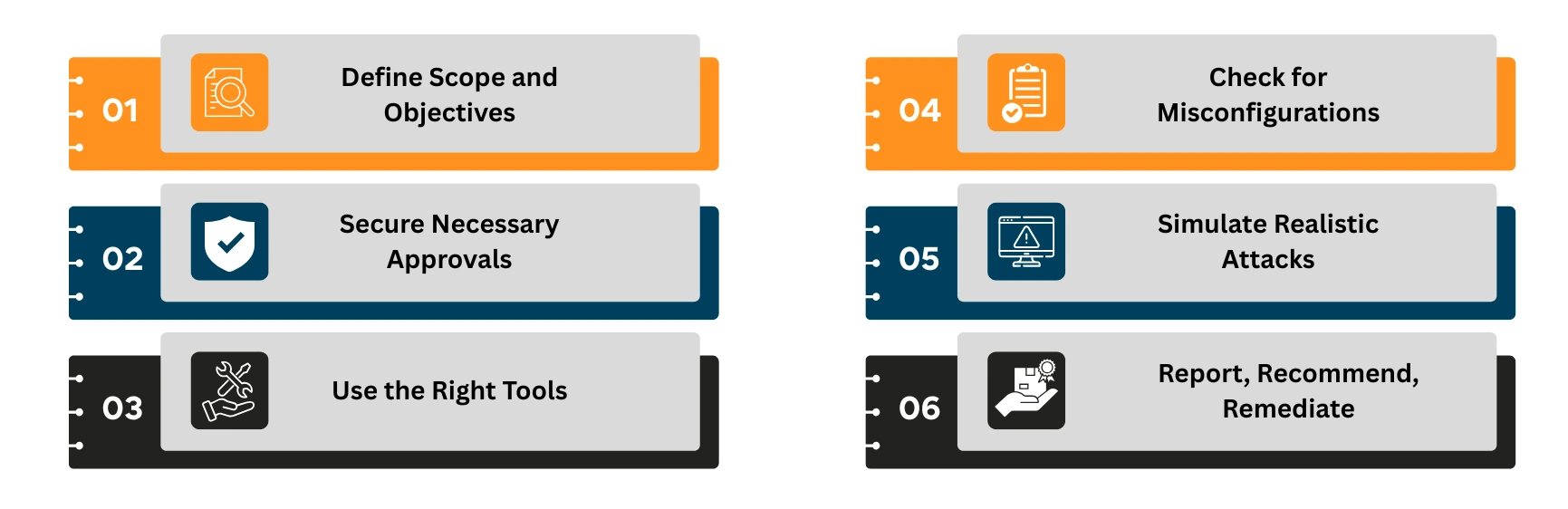
- Define Scope and Objectives
Before you begin, frame the test like a mission.
Decide what success looks like:
Which assets are in scope (e.g., EC2, S3, Azure Blob, Kubernetes clusters)?
Are you uncovering IAM weaknesses, testing data storage, or evaluating resilience under attack?
A well-defined scope reduces noise and ensures findings align with business risk.
- Secure Necessary Approvals
Each cloud provider handles penetration testing differently, and overlooking this step can halt your assessment before it starts.
- AWS requires customers to follow its Penetration Testing Policy, which allows testing of specific services but prohibits disruptive activities like denial-of-service.
- Azure does not require prior approval for standard penetration tests on customer-owned assets, but it enforces strict restrictions on testing shared infrastructure or simulating phishing.
- GCP allows penetration testing on your own projects without notifying Google, yet explicitly bans activities such as social engineering, DDoS, or targeting other tenants.
Why does this matter?
Securing provider approvals, along with internal executive sign-off, ensures your testing is compliant, safe, and credible.
- Use the Right Tools
Choose tools tailored to each platform:
| Cloud Provider | Recommended Tools |
| AWS | Prowler, ScoutSuite, CloudSploit |
| Azure | Azucar, MicroBurst, Stormspotter |
| GCP | Forseti Security, GCPBucketBrute |
Enhance coverage with cross-platform tools like Burp Suite, Metasploit, and Nmap.
- Check for Misconfigurations
Misconfigurations are the leading cause of cloud incidents. Here’s what to test across AWS, Azure, and GCP:
- Ensure least privilege IAM and no overly permissive roles or service accounts.
- Enforce MFA on all admin and root accounts.
- Block public access to storage buckets (S3, Blob, GCS).
- Secure API endpoints and management interfaces.
- Disable daily use of cloud root accounts.
- Enable logging and monitoring (CloudTrail, Azure Monitor, GCP Logging).
- Encrypt data at rest and in transit.
- Run continuous posture checks with CSPM tools.
- Validate IaC templates to prevent misconfigurations at deployment.
- Simulate Realistic Attacks
Depending on access levels (black box, grey box, white box):
- Attempt IAM privilege escalation
- Move laterally across cloud VMs
- Exfiltrate from unsecured storage buckets
- Probe APIs for authentication flaws
Do not attempt DDoS, stress tests, or infrastructure-wide scanning; they are often prohibited.
- Report, Recommend, Remediate
Your report should include:
- A non-technical overview that explains the main risks and their potential business impact.
- A clear record of what was tested, which tools were used, and what limits were agreed on.
- Each vulnerability is explained with evidence, severity, and how an attacker could exploit it.
- Practical steps for closing the gaps, ranked by priority.
- Alignment with standards like PCI-DSS, HIPAA, or ISO27001 to support audits.
- Guidance on retesting and confirming that the issues have been fixed.
To identify critical vulnerabilities in your cloud environment before attackers do: Download our exclusive Checklist
Real-World Cloud Attack Scenarios in 2025
Cybercriminals are evolving with clouds. Here is what you need to prepare for:
- Misconfigurations: A single checkbox set the wrong way can open entire workloads to the internet. From storage buckets to firewall rules, misconfigurations remain the number one cause of cloud breaches.
- Public Bucket Exposures: AWS S3, Azure Blob, or GCP Storage buckets left public still leak millions of records every year. What looks like “just a dev bucket” can quickly turn into a headline breach.
- Credential Leaks in CI/CD Pipelines: When secrets are hard-coded in code repositories or build scripts, attackers steal them to gain persistent cloud access. Compromised pipelines do not just hit one app; they compromise your entire delivery chain.
- Exposed APIs and Privilege Escalation: Poorly secured APIs and over-permissive roles are an attacker’s dream. They provide the perfect launchpad for privilege escalation, lateral movement, and eventually full environment compromise.
When to Perform Cloud Pen Tests
The timing of a cloud penetration test is just as important as the test itself. In fast-moving environments like AWS, Azure, and GCP, risks do not only appear once a year; they emerge whenever systems change, scale, or connect with new services.
The right time to test is after major changes, before audits, following incidents, and at regular intervals that keep pace with the cloud’s speed. Testing at the wrong time can leave blind spots that attackers exploit long before the next scheduled assessment.
Need Help?
Not every team has the bandwidth or expertise to perform cloud pen tests. We help organizations conduct safe, compliant penetration testing across AWS, Azure, and GCP.
Contact our experts to get started.
Conclusion: Adopt a Zero Trust Mindset
Penetration testing in the cloud is no longer optional; it is essential. But testing alone is not enough. With identity-based threats and API exposure on the rise, adopting a Zero Trust approach is key.
Zero Trust assumes no implicit trust; every user, device, and system must be continuously verified.
Combine regular cloud pen testing with Zero Trust architecture to:
- Minimize lateral movement risk
- Strengthen IAM and access controls
- Increase visibility across your cloud assets
Start by integrating penetration testing into your CI/CD pipeline and enforcing least privilege across all accounts.



Popular Articles
In the digital age, businesses must adopt an ad
GRC is the capability, or integrated collection
Get the latest insights straight from our desk to your inbox.
Featured Articles
Explore more →
Whitepaper: Ransomware Threat Management
Ransomware continues to be a real threat to business operations across all industries, no organization is safe from this threat.
Laszlo S. Gonc
CISSP, First Senior Fellow, DivIHN Cybersecurity Center of Excellence view
Cybersecurity Incident Response Preparedness
An incident response framework provides a structure to support incident response operations. A framework typically provides guidance on what needs to be done, but not on how it is done.
Laszlo S. Gonc
CISSP, First Senior Fellow, DivIHN Cybersecurity Center of Excellence view
IoT Medical Device Cybersecurity
Healthcare data and medical devices would be aggressively targeted by ransomware attacks since early 2017 has proven to be true